 Demo data
Incidents
All editions
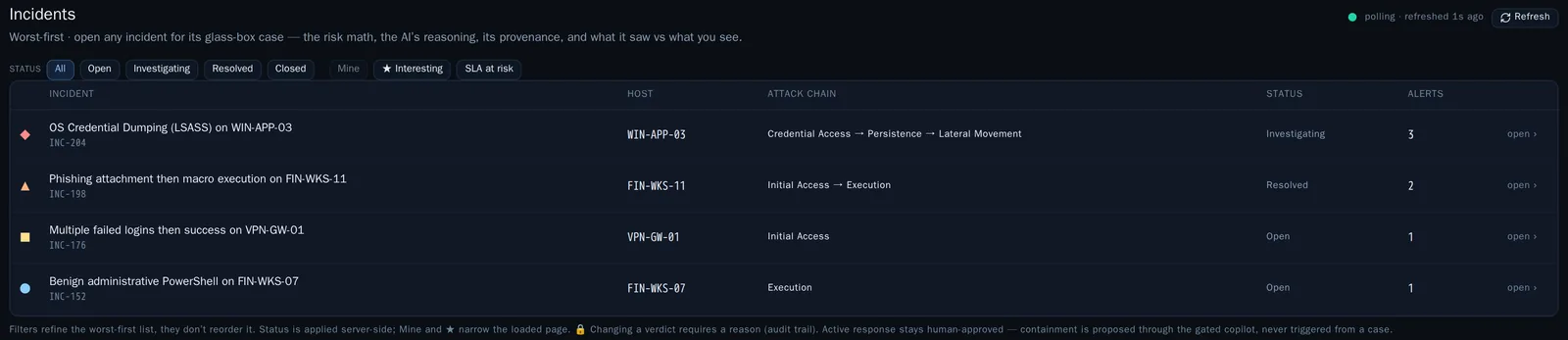
Every incident, worst first, with the attack chain it belongs to. Open one for the full case: its alerts, timeline and the AI's reasoning.
AI SOC on Wazuh · self-hosted
DHRUVA sits on top of your Wazuh and does the analyst's first pass. It checks every alert against what it knows about your environment, gives a verdict with its reasoning shown, and groups related alerts into incidents. Response actions wait for a person to approve them. It all runs on your own servers.

 Demo data
A SIEM like Wazuh sees everything. One or two people cannot read everything, so real signals sit next to the noise.
Client questionnaires, SOC 2, ISO 27001, CERT-In and DPDP all ask the same thing: show how you monitor and respond. How DHRUVA helps with evidence.
Hiring a team or buying an enterprise SIEM costs more than most growing companies can justify.
Follow one alert
This is what happens to every alert. The screenshots come from the real dashboard, filled with demo data.
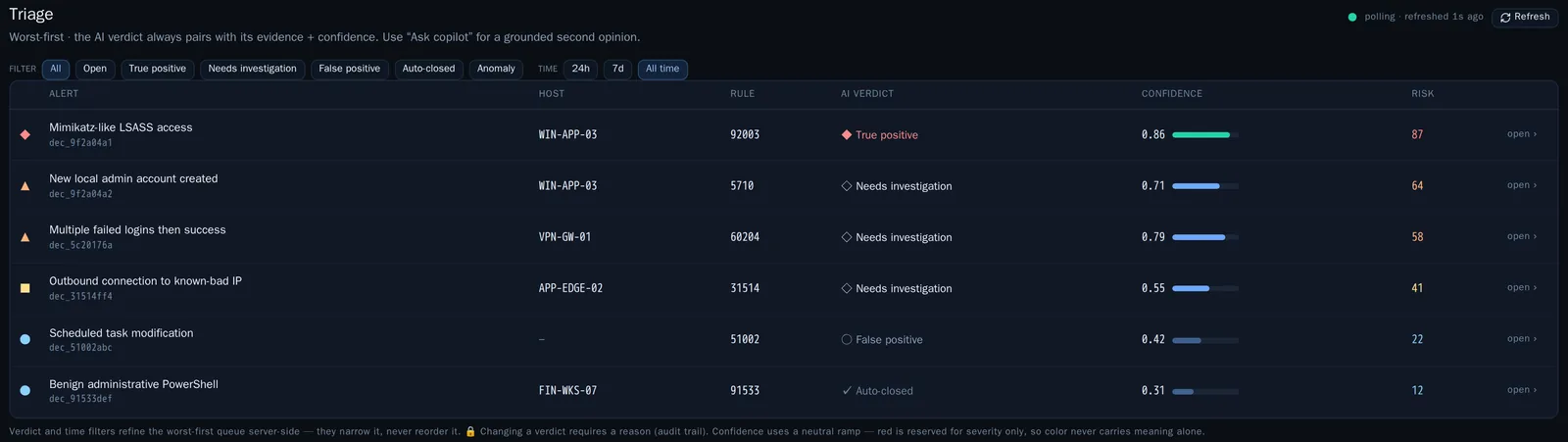
DHRUVA reads new alerts from your Wazuh indexer and queues them riskiest first, so the worst ones are triaged first. Alerts that match a threat-intelligence indicator jump the queue.
All editions
 Demo data
Before any model sees the alert, DHRUVA joins it with what it knows about your environment. Each piece of context changes the risk score, and you can see by how much.
All editions
Hostnames, internal IP addresses, usernames and Windows account fields are replaced with tokens before the prompt leaves DHRUVA. Email addresses, phone numbers and some national ID numbers in free text are redacted. Your analysts still see the real names.
Command lines, file paths and process names are sent as they are, because spotting malware depends on the exact text. They can contain usernames. Read the full scope.
All editions
 Demo data
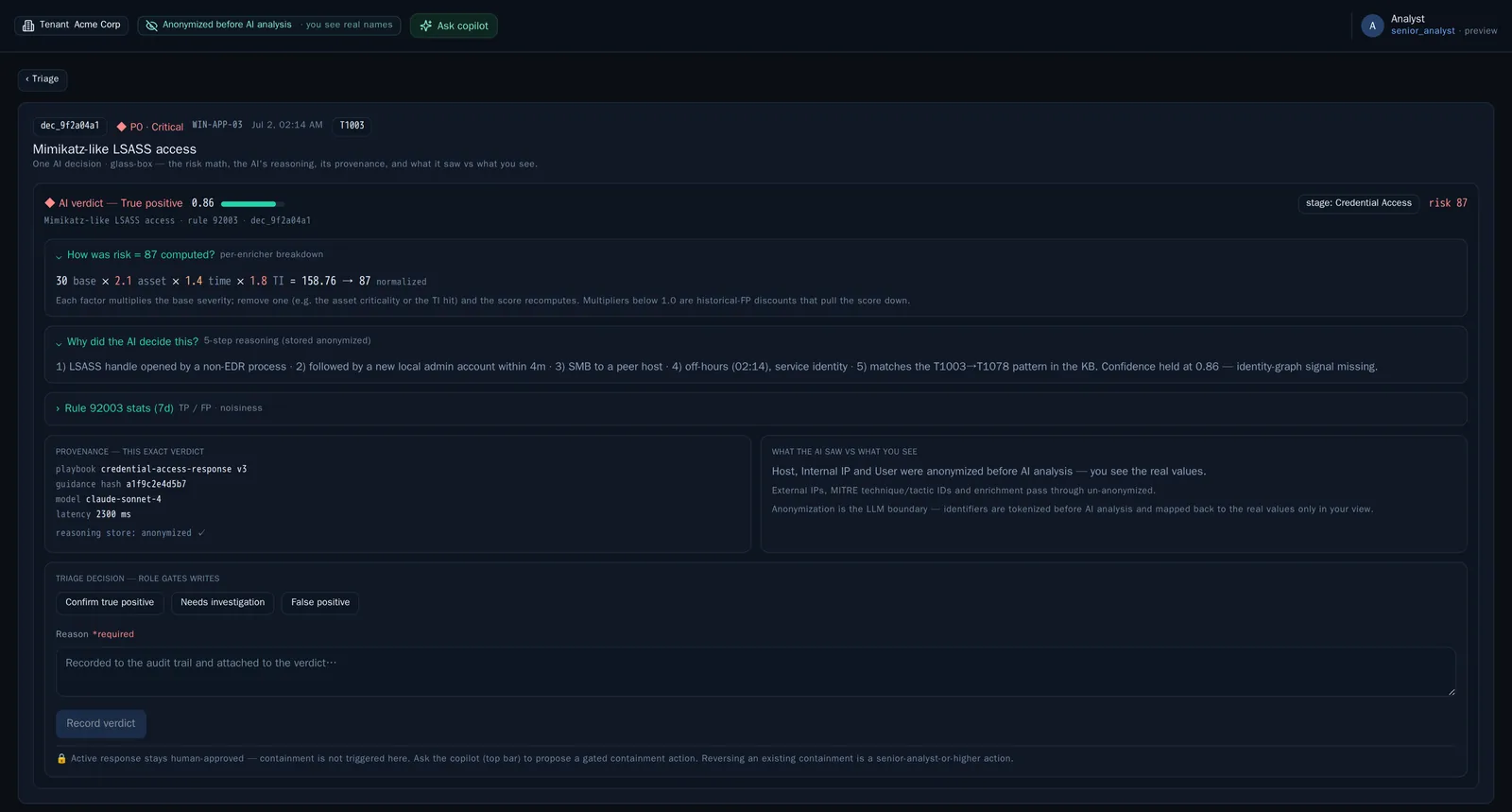
The model returns a verdict with a confidence score and its reasoning, step by step. The risk score is shown as a calculation you can check: base severity multiplied by factors for the asset, the user, the time, threat intelligence and past false alarms.
Verdicts below the confidence floor go to a person, whatever the model said. Some critical patterns skip the model and go straight to a person. A separate check flags reasoning that the evidence does not support.
All editions
 Demo data
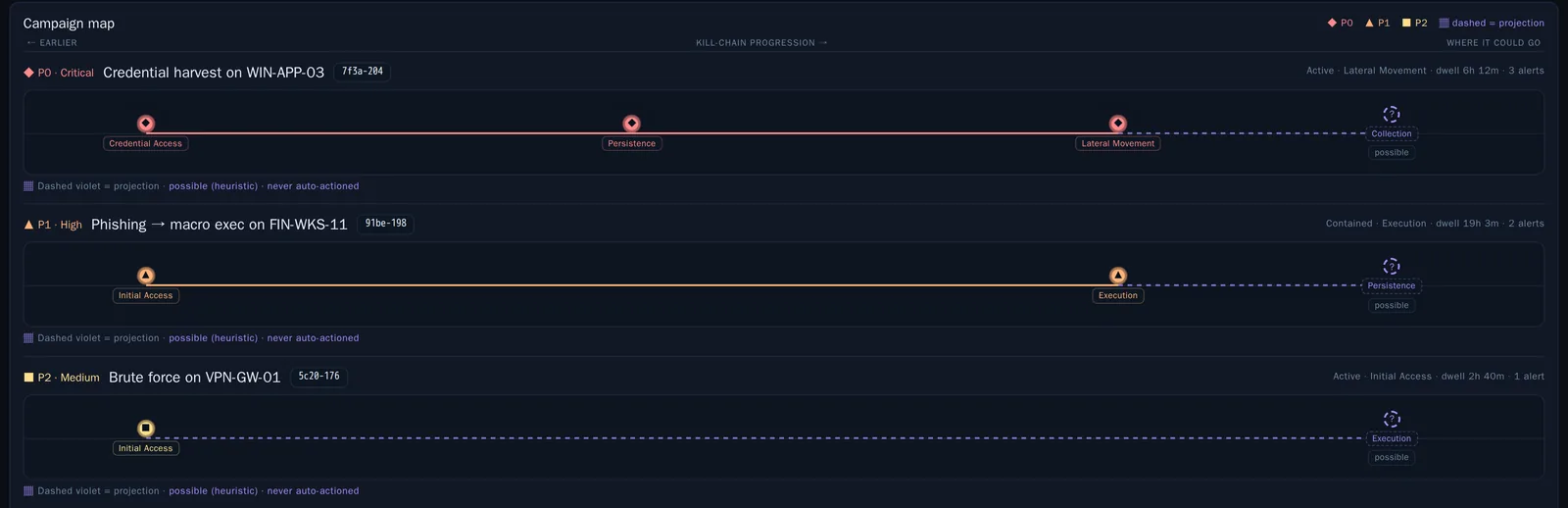
DHRUVA groups related alerts into incidents. When alerts on the same host or user move through two or more MITRE ATT&CK tactics, it links them into an attack chain in kill-chain order, shown as a campaign.
All editions
 Demo data
An analyst confirms or changes the verdict. A reason is required for any change, and it goes into the audit trail.
In Enterprise, containment actions such as blocking an IP or isolating a host are proposed into a queue. They run only after a senior analyst approves them, and every action is logged with who asked, who approved and why.
Verdicts: all editionsResponse actions: Enterprise
 Demo data
Every few hours, DHRUVA looks at where analysts disagreed with the AI and which Wazuh rules keep raising false alarms. It drafts a rule change, checks it with Wazuh's rule tester, and puts it in front of a person. Nothing is deployed until someone approves it, and a deployed change can be rolled back.
Team and Enterprise
Product tour
Demo data
All editions
Every incident, worst first, with the attack chain it belongs to. Open one for the full case: its alerts, timeline and the AI's reasoning.
 Demo data
Team and Enterprise
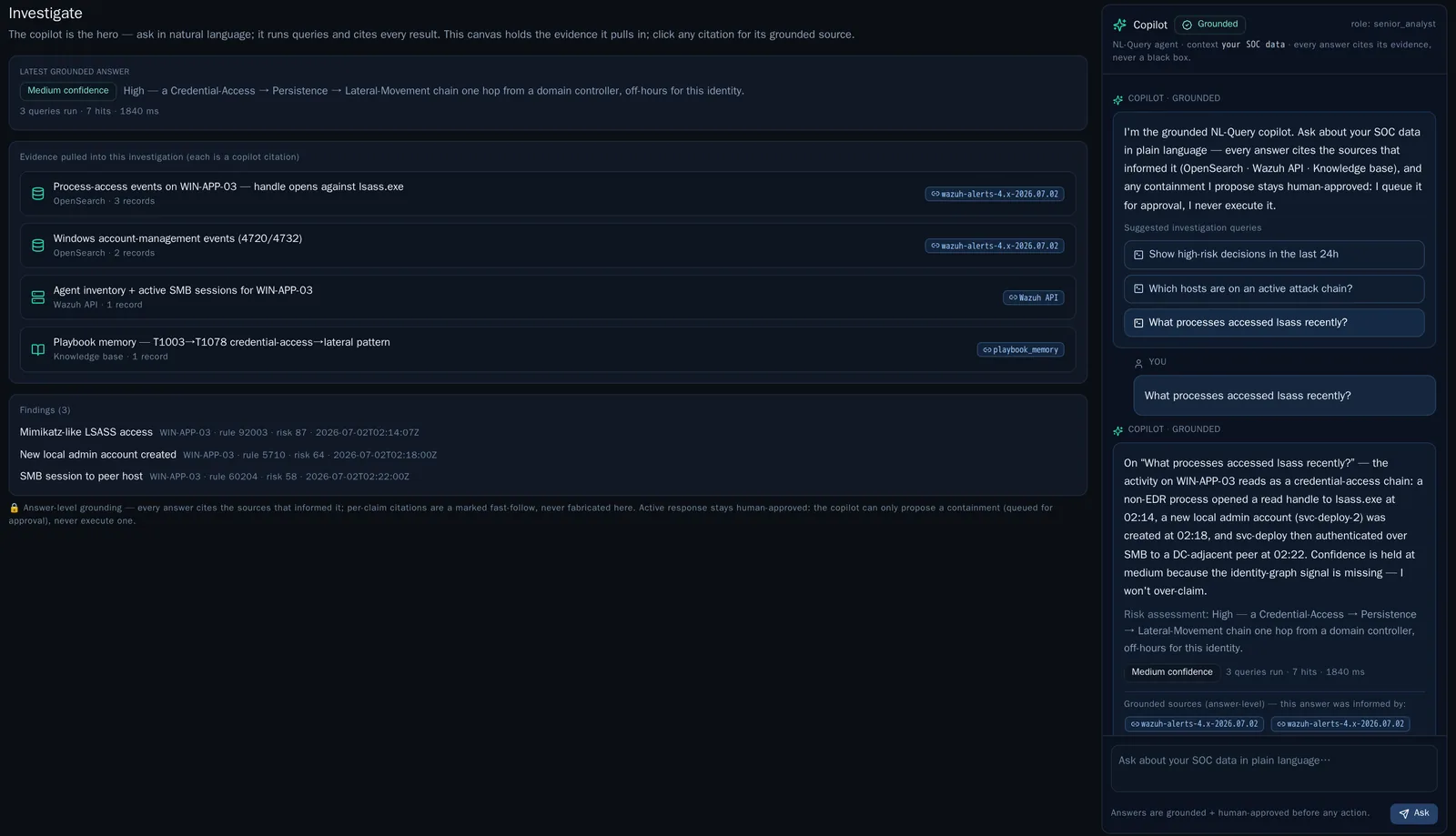
Ask a question about your security data in plain English. The copilot shows which sources each answer drew on.
 Demo data
Team and Enterprise
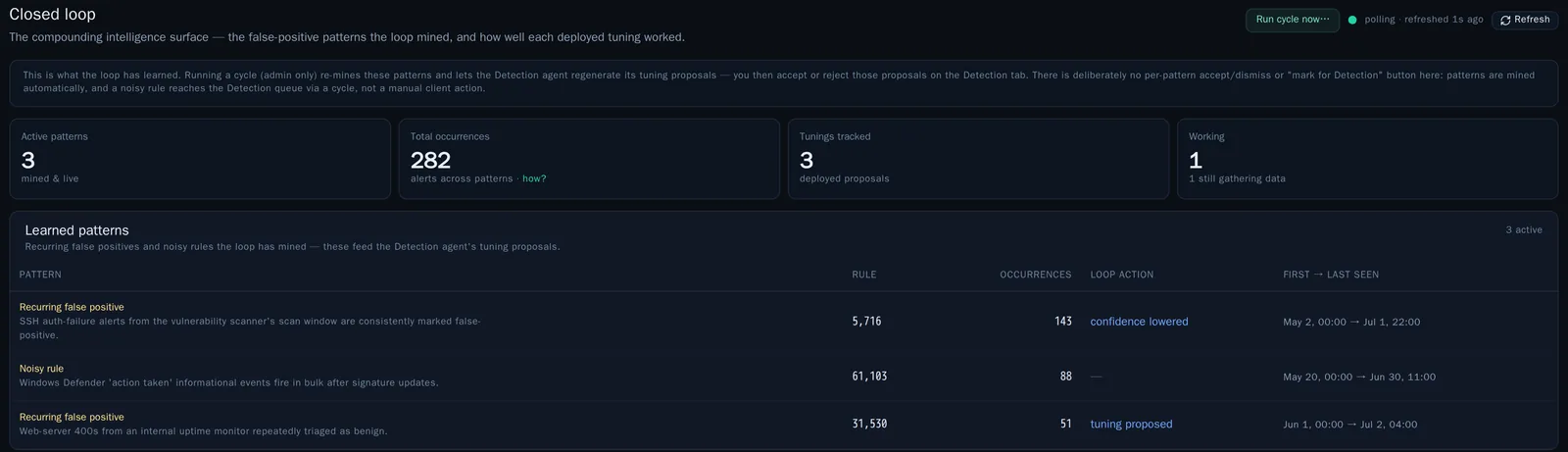
The noisy rules and recurring false alarms DHRUVA has found from your team's reviews, and for each deployed change, whether false alarms dropped without losing real detections.
Who it is for
One or two people look after security. DHRUVA does the first pass on every alert and puts the riskiest ones in front of you, with the reasoning written out.
Follow one alertSOC 2, ISO 27001, CERT-In or a client questionnaire wants proof that you watch and respond. DHRUVA records every decision, every override with its reason, and every response.
Compliance evidenceYou are regulated, or your customers rule out a third-party cloud. DHRUVA runs on your servers, and with a model you host yourself, no AI call leaves your network either.
Security and your dataEditions and pricing
Free
Open source · up to 5 users
$999/month
or $9,990 a year · 25 users · unlimited agents and alerts
$2,999/month
billed yearly
No per-device pricing: the price stays the same as your fleet grows. Need Wazuh set up first? We install and tune it.
| Feature | Community | Team | Enterprise |
|---|---|---|---|
| AI triage with reasoning, confidence and risk math | Yes | Yes | Yes |
| Asset, identity, history, time and threat-intel context | Yes | Yes | Yes |
| Identifiers tokenized before the model | Yes | Yes | Yes |
| 7 free threat-intel feeds, with CISA KEV and EPSS for CVEs | Yes | Yes | Yes |
| Incidents, attack chains and campaigns | Yes | Yes | Yes |
| MITRE ATT&CK coverage map | Yes | Yes | Yes |
| Knowledge base | Yes | Yes | Yes |
| Detection tuning: rule changes drafted from your feedback, approved by a person | No | Yes | Yes |
| Plain-English questions (copilot) | No | Yes | Yes |
| Daily Review, a plain-language briefing | No | Yes | Yes |
| Daily, weekly and monthly reports | No | Yes | Yes |
| Slack and email notifications, ticketing | No | Yes | Yes |
| AbuseIPDB, VirusTotal and AlienVault OTX lookups (your own keys) | No | Yes | Yes |
| Host integrity views (file integrity, rootcheck, inventory) | No | Yes | Yes |
| Threat hunting | No | No | Yes |
| Response actions with an approval queue, SOAR playbooks | No | No | Yes |
| Compliance views (configuration assessment, framework coverage) | No | No | Yes |
| SLA tracking and incident merge | No | No | Yes |
| Multi-tenant isolation for MSSPs | No | No | Yes |
Questions
No. Wazuh is the SIEM: it collects logs and raises alerts. DHRUVA is the analyst layer on top. It reads Wazuh alerts, adds context, gives a verdict, groups alerts into incidents and proposes responses. You need Wazuh, with its indexer, running first. If you don't have it yet, we can install and tune it for you.
They stay on your servers. DHRUVA reads alerts from your Wazuh indexer and keeps its own records in your PostgreSQL database. Nothing is sent to Secure Sleuths.
What does leave, and only if you set it up that way:
Anthropic Claude, OpenAI and Groq through their APIs with your own key, or a model you run yourself through Ollama. Each deployment uses one provider end to end. If that provider fails, DHRUVA does not quietly switch to another one.
It will be, sometimes. DHRUVA is built for that:
We do not publish accuracy figures yet. We will only publish numbers we have measured.
On response actions, no, unless you choose otherwise. Response actions (Enterprise) are human-approved by default. The only action that can ever run automatically is blocking an external IP address, and only if you turn it on. Even then it needs the AI to call the alert a true positive above a confidence floor and a threat-intel match on that exact IP. It is rate-limited, expires after a set time, and never blocks internal or allowlisted addresses. Isolating a host, killing a process or disabling a user always needs a person.
On alerts: DHRUVA can close an alert it judges harmless with high confidence. Each one is kept with its reasoning and can be reviewed and overridden. You can switch this off so every dismissal waits for a person.
Community is free and open source under the Apache 2.0 licence. It includes AI triage with reasoning, all the context and risk scoring, identifier tokenization, incidents with attack chains and campaigns, the MITRE ATT&CK map, 7 free threat-intel feeds and the knowledge base. It covers up to 5 users, with unlimited agents and alerts. Paid features are removed from the Community build, not just hidden.
It depends on your setup, so we don't quote a number. DHRUVA runs with Docker Compose next to an existing Wazuh, and it needs PostgreSQL 16 or newer (a bundled one is available). On a demo call we look at your environment and tell you what is involved.
Yes. If you don't run Wazuh yet, Secure Sleuths can install and tune it, then set up DHRUVA on top.
DHRUVA runs where you put it, so its records stay in the country and data centre you choose, including India. With a model you host through Ollama, no AI call leaves your network.
The free threat-intel feeds download indicator lists from the internet, so a fully offline install has less threat-intel context. We have not published an air-gapped install guide. Tell us about your environment and we will say plainly what works.
No tool can do that on its own. DHRUVA helps you produce evidence for CERT-In, DPDP, SOC 2 and ISO 27001: how you monitor, how you decide, how you respond. See what it records for each.
In 30 minutes we walk through DHRUVA on a live Wazuh feed and talk through what a trial on your data would look like.